Whether you're a developer formatting variable names, a writer polishing a headline, or a student fixing an accidental Caps Lock disaster, manually retyping text to change its case is a frustrating waste of time. That's where a dedicated Text Case Converter comes in — a simple tool that instantly transforms your text into the exact format you need, with zero typing required.
In this guide, we'll break down every major text case format, explain when to use each one, and show you how to convert text in seconds using FastestChecker's free online Text Case Converter.
What Is a Text Case Converter?
A text case converter is a utility that takes any block of text and reformats its capitalization pattern — without altering the actual words. Instead of manually deleting and retyping letters, you paste your text once and select the case style you want. It's instant, accurate, and works with any length of content, from a single sentence to an entire document.
Common Text Case Formats Explained
1. UPPERCASE
Every letter is capitalized. Commonly used for headlines, warnings, acronyms, or emphasis (e.g., IMPORTANT NOTICE). Overuse in body text is considered shouting, so it's best reserved for short labels or CTAs.
2. lowercase
All letters are converted to their lowercase form. Useful for stylistic branding (like many modern logos and usernames), cleaning up accidentally-capitalized text, or preparing text for case-sensitive systems.
3. Title Case
The First Letter Of Each Major Word Is Capitalized — this is the standard format for blog titles, book names, and headlines. Minor words like "a," "the," and "of" are typically left lowercase unless they start the sentence.
4. Sentence case
Only the first letter of the sentence (and proper nouns) is capitalized, exactly like standard prose writing. This is the most natural-reading format and is ideal for body paragraphs, descriptions, and form inputs.
5. camelCase
Used heavily in programming, camelCase joins words together with no spaces, capitalizing the first letter of every word except the first — e.g., firstNameLastName. It's standard in JavaScript variable and function naming.
6. PascalCase
Similar to camelCase, but the first letter is also capitalized — e.g., FirstNameLastName. Commonly used for class names and component naming in languages like Java, C#, and React.
7. snake_case
Words are lowercase and separated by underscores — e.g., first_name_last_name. Popular in Python, database column naming, and configuration files.
8. kebab-case
Words are lowercase and separated by hyphens — e.g., first-name-last-name. Widely used in URLs, CSS class names, and file naming conventions for SEO-friendly slugs.
Comparison Table: When to Use Each Case Format
| Case Format | Example | Best Used For |
|---|---|---|
| UPPERCASE | HELLO WORLD | Warnings, acronyms, emphasis |
| lowercase | hello world | Usernames, casual branding |
| Title Case | Hello World | Blog titles, headlines |
| Sentence case | Hello world | Body text, form fields |
| camelCase | helloWorld | JavaScript variables |
| PascalCase | HelloWorld | Class/component names |
| snake_case | hello_world | Python, database fields |
| kebab-case | hello-world | URL slugs, CSS classes |
Who Uses a Text Case Converter?
- Developers — Converting variable names, constants, and functions seamlessly between camelCase, snake_case, PascalCase, and CONSTANT_CASE when switching between programming languages, refactoring code bases, or maintaining clean coding standards.
- Writers & Bloggers — Quickly formatting headlines, subheadings, and blog titles into proper Title Case or Sentence case without manually checking complex capitalization rules, saving valuable editorial time.
- Students — Effortlessly fixing assignments, research papers, and study notes pasted from scanned PDFs, ebooks, or online resources that accidentally came out in all caps, misplaced capitalization, or broken text formatting.
- SEO Specialists — Instantly generating clean, search-engine-friendly, hyphenated kebab-case slugs and dot.case URL structures for web pages, articles, and content management systems.
- Social Media Managers — Creating stylized lowercase, UPPERCASE, or unique alternating captions and hashtags for aesthetic branding across platforms like Instagram, Twitter, and LinkedIn.
How to Use FastestChecker's Text Case Converter
Using the Text Case Converter takes less than 10 seconds:
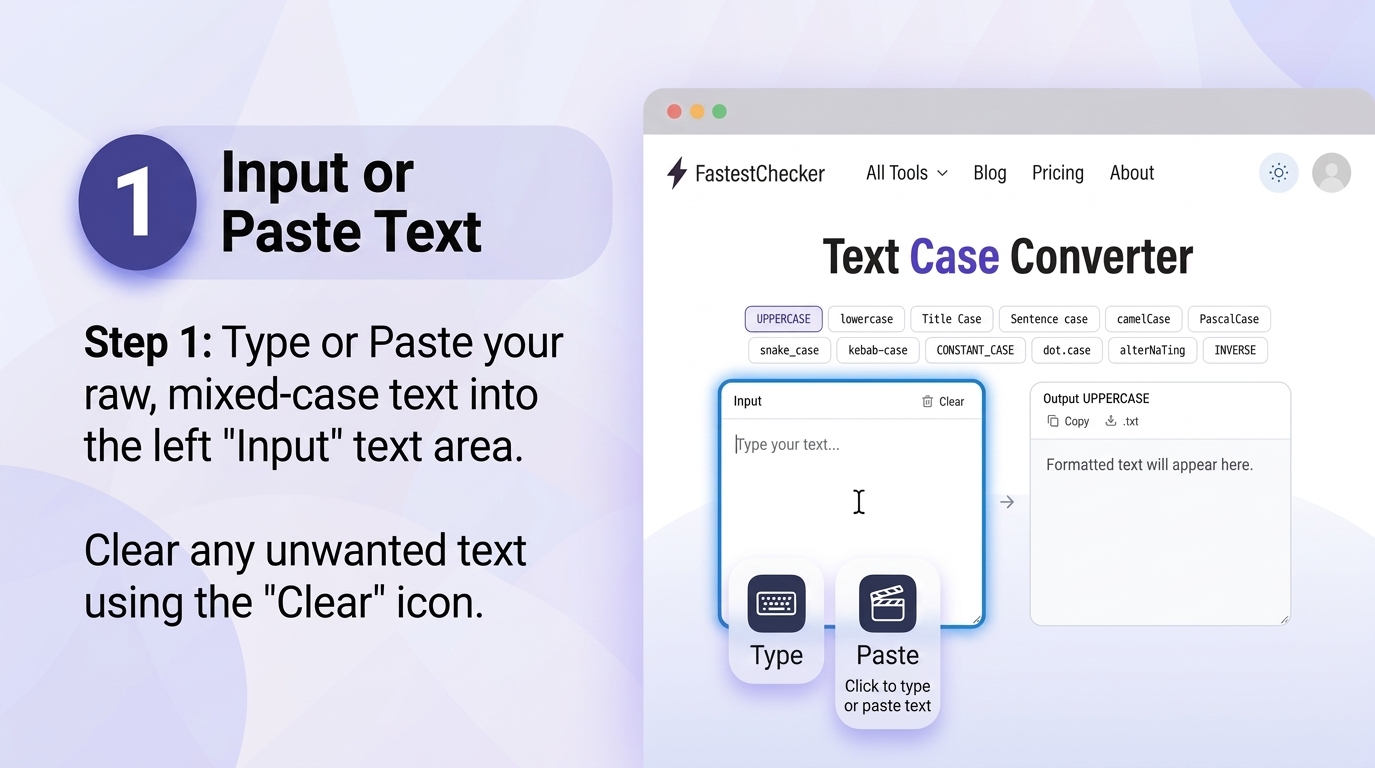
- Paste or type your text into the input box. Copy your raw, unformatted, or mixed-case text from any source document, email, or web page, and simply paste or directly type it into the dedicated left-hand input text area to initiate the process.
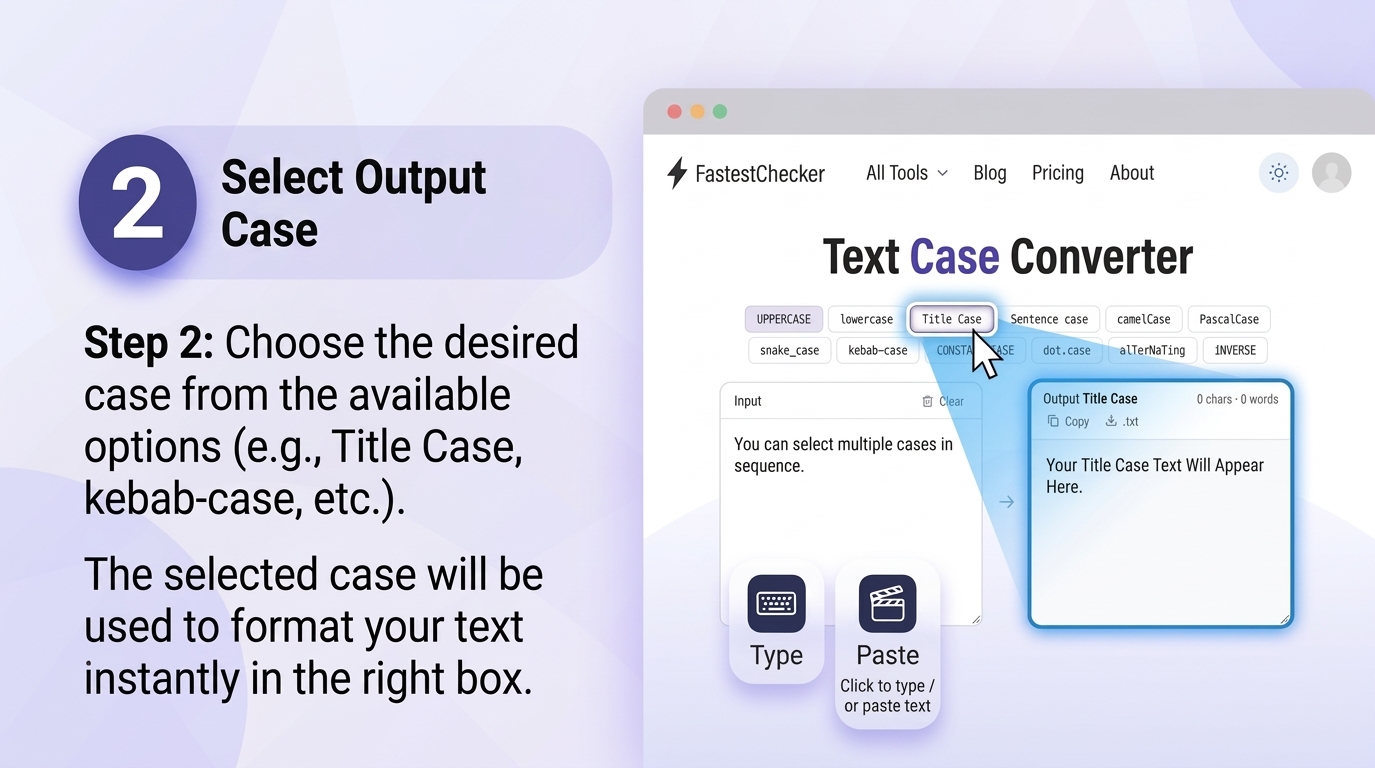
- Select your desired case format (UPPERCASE, lowercase, Title Case, Sentence case, camelCase, PascalCase, snake_case, or kebab-case). Browse through our comprehensive list of conversion buttons and click on your required style to immediately transform your text according to standard editorial rules or technical programming naming conventions.
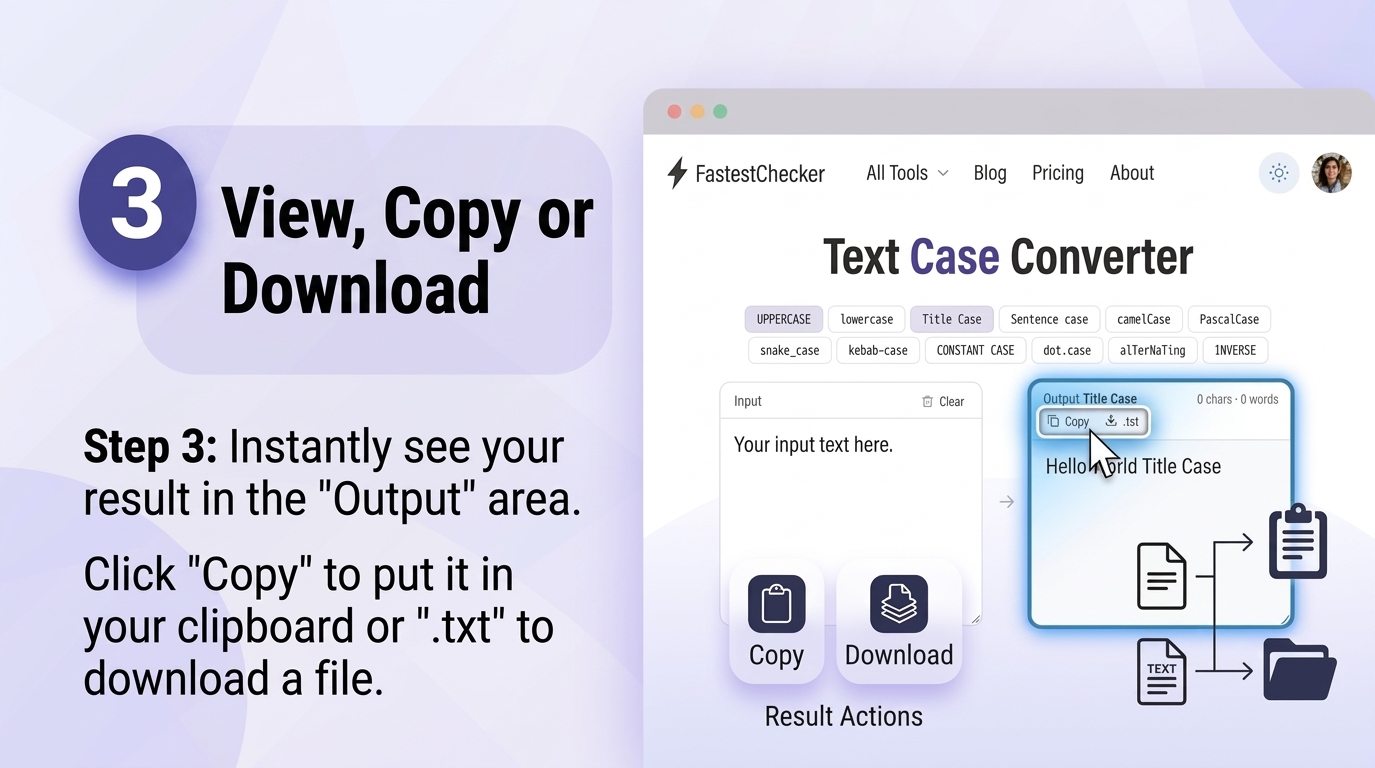
- Instantly view the converted output. Monitor your freshly formatted text as it updates instantly and automatically in real-time inside the right-hand output box without requiring page reloads or processing delays.
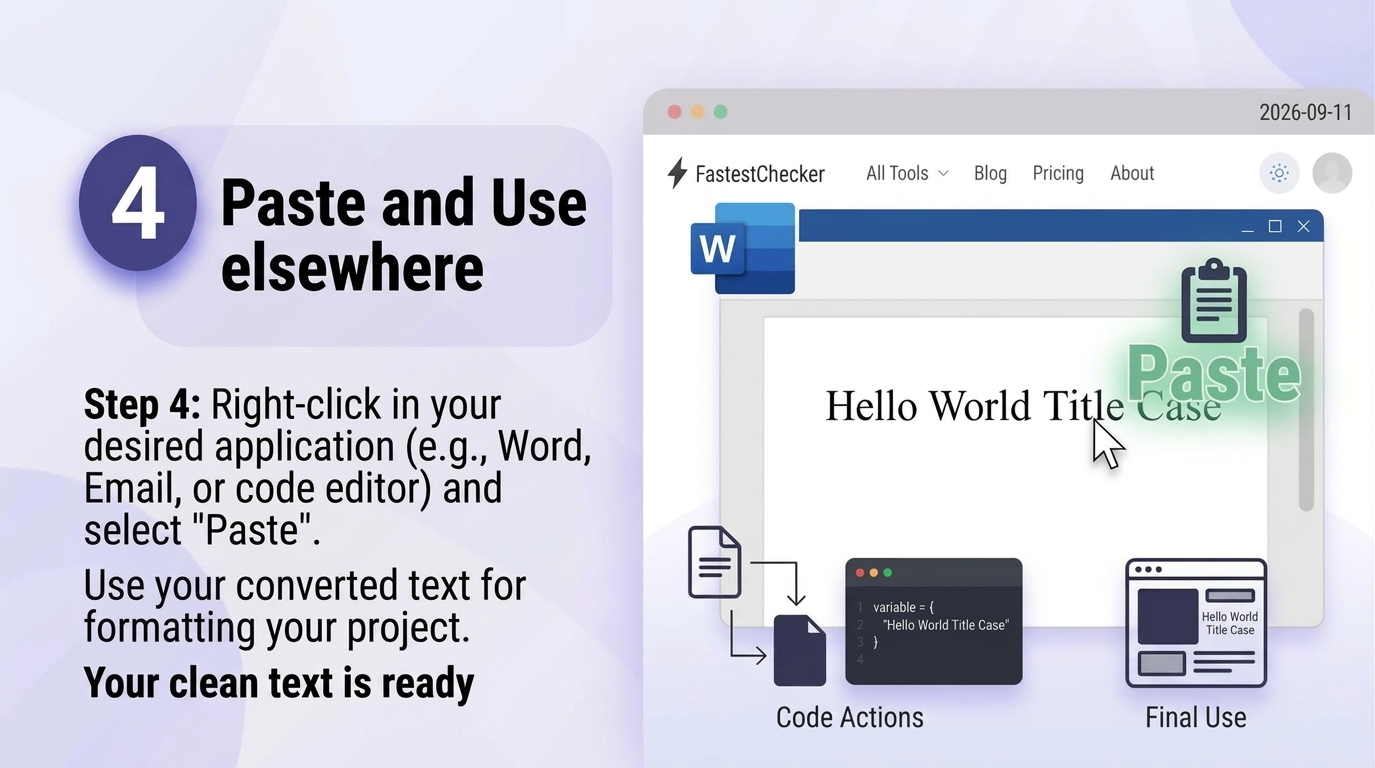
- Copy the result with a single click and paste it wherever you need. Utilize the "Copy" button to instantly move the formatted text to your clipboard, or download it as a plain text file (.txt) for quick integration into your projects, documents, code editors, or content platforms.
Pro Tip: If you're generating SEO-friendly URLs for a new blog post, convert your title to kebab-case using the Text Case Converter, then verify your page loads fast with our PageSpeed & Web Vitals Checker before publishing.
Common Mistakes When Formatting Text Manually
Manually adjusting text case is more error-prone than it seems. Common issues include missed words in the middle of long paragraphs, inconsistent capitalization of minor words in Title Case, and accidentally introducing extra spaces or line breaks. An automated converter eliminates all of these risks by applying consistent rules across the entire text block every time.
Text Case and SEO: Why It Matters
Search engines and browsers are generally case-insensitive when indexing URLs, but consistency still matters for professionalism and user trust. Well-formatted Title Case headlines improve readability and click-through rates in search results, while clean kebab-case URLs (like /text-case-converter-guide) are considered an SEO best practice because they're easy for both users and search engines to parse.
Final Thoughts
A text case converter might seem like a small utility, but it saves real time across writing, coding, and publishing workflows. Instead of manually retyping or fixing capitalization by hand, let automation handle it instantly. Try the free Text Case Converter on FastestChecker today, and explore our other free tools like the Email Validator and Password Generator to streamline your daily digital workflow.
Naming Conventions in Modern Software Engineering
Software architectures enforce strict casing conventions across programming languages and data serialization standards:
- camelCase: The universal standard for JavaScript and TypeScript variables, object keys, and JSON API payloads (e.g.
userRegistrationDate); - PascalCase: Designated for class declarations, React component names, and TypeScript interfaces (e.g.
UserProfileCard); - snake_case: Enforced in Python PEP 8 conventions, PostgreSQL column definitions, and C library functions (e.g.
created_at_timestamp); - kebab-case: Mandatory for URL slugs, RESTful path parameters, and CSS class selectors (e.g.
blog-post-header); - SCREAMING_SNAKE_CASE: Reserved for immutable global constants and operating system environment variables (e.g.
API_SECRET_KEY).
Database Collation and Case-Insensitive Queries (CI vs. CS)
In relational database management systems (PostgreSQL, MySQL, SQL Server), how string casing is handled depends on column collation settings. A case-insensitive collation (such as utf8mb4_general_ci or en_US.UTF-8 with ILIKE) treats uppercase and lowercase strings identically during search queries, preventing user login failures when email addresses or usernames are entered with mixed casing. Normalizing text into standardized lowercase prior to indexing accelerates index lookup speeds.
Frequently Asked Questions
Is the FastestChecker Text Case Converter free to use?
Yes, the Text Case Converter is completely free with no sign-up required. You can convert unlimited text between UPPERCASE, lowercase, Title Case, Sentence case, camelCase, PascalCase, snake_case, and kebab-case instantly.
Does converting text case affect the actual words or spelling?
No, a text case converter only changes capitalization patterns — it does not alter spelling, punctuation, or word order, so your original content remains fully intact.
Which case format should I use for URL slugs?
Kebab-case (lowercase words separated by hyphens, like 'my-blog-post') is the recommended format for URL slugs because it's clean, readable, and preferred by search engines for SEO.
Can I use the Text Case Converter for programming variable names?
Yes, it's especially useful for developers who need to quickly switch variable naming conventions between camelCase, PascalCase, and snake_case depending on the programming language's style guide.
Muhammad Asad Arshad is the Founder and Lead Software Architect of FastestChecker, specializing in client-side Web APIs, cryptographic standards, and network diagnostics.