QR codes have quietly become one of the most powerful bridges between the physical and digital world. From restaurant menus to product packaging, event tickets to business cards, that small square of black-and-white pixels can instantly connect a person to a website, a WiFi network, a contact card, or a payment page — no typing required.
In this guide, we'll walk through everything you need to know about QR codes: what they are, the different types you can create, real-world use cases, and how to generate your own free, high-quality QR code in seconds using our QR Code Generator.
What Is a QR Code, Exactly?
QR (Quick Response) code is a two-dimensional barcode that stores data in a grid of black and white squares. Unlike traditional 1D barcodes that only hold a string of numbers, QR codes can encode much more information — URLs, text, contact details, WiFi credentials, and more — while remaining scannable even if part of the code is damaged or obscured, thanks to built-in error correction.
Any modern smartphone camera can scan a QR code instantly, which is exactly why they've exploded in popularity since 2020, especially for contactless menus, payments, and marketing campaigns.
Why QR Codes Matter for Businesses and Individuals
1. Frictionless User Experience
QR codes eliminate the need to manually type long URLs or search for a business online. A single scan takes users exactly where you want them — instantly and accurately.
2. Bridging Print and Digital Marketing
Flyers, posters, packaging, and business cards become interactive when they include a scannable QR code linking to a website, video, or promotion. This turns static print materials into measurable digital touchpoints.
3. Contactless Convenience
Restaurant menus, event check-ins, and payment systems increasingly rely on QR codes for a fast, hygienic, and paperless experience.
4. Trackable Engagement (with Dynamic QR Codes)
Dynamic QR codes let you monitor scan counts, locations, and times — giving marketers real data on campaign performance, something static print materials could never offer before.
Types of QR Codes You Can Create
- URL/Website QR Code: The most common type — scanning it opens a specific webpage instantly.
- Text QR Code: Displays a block of plain text directly on the scanning device, no internet required.
- WiFi QR Code: Encodes network name and password so guests can connect to WiFi with a single scan, no manual typing.
- vCard/Contact QR Code: Stores contact information (name, phone, email, company) that saves directly to the scanner's address book.
- Email QR Code: Opens a pre-filled email draft with recipient, subject, and body already populated.
- SMS QR Code: Opens the messaging app with a pre-filled phone number and message text.
- Phone Number QR Code: Initiates a call to a specific number when scanned.
- Social Media QR Code: Links directly to a profile on Instagram, Facebook, LinkedIn, or other platforms.
- Payment QR Code: Used in apps like PayPal, digital wallets, or regional payment systems for quick transactions.
How to Create a QR Code with FastestChecker
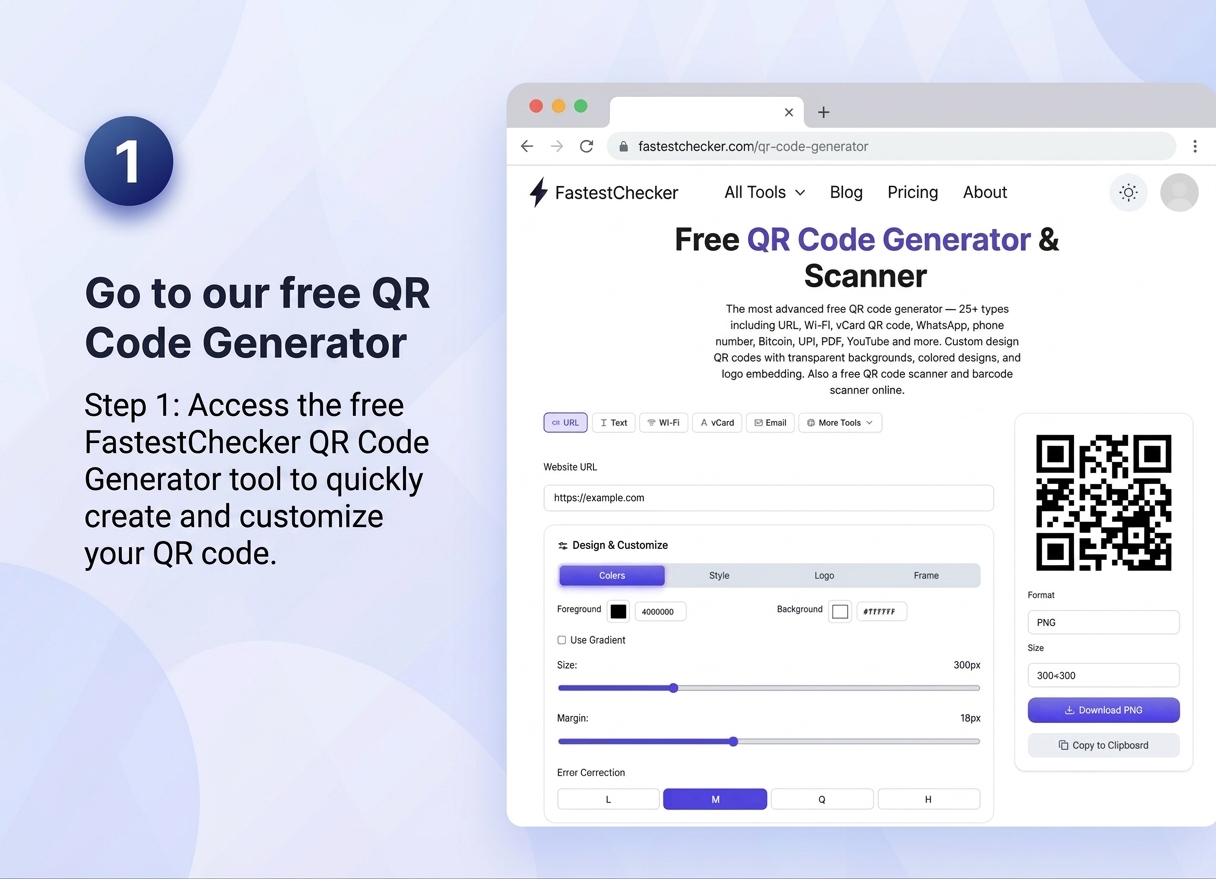
- Go to our free QR Code Generator. Visit the FastestChecker QR Code Generator tool directly through your web browser on any desktop, tablet, or smartphone. Our online generator is completely free to use, requires no registration or software download, and offers access to over 25 different QR code types.
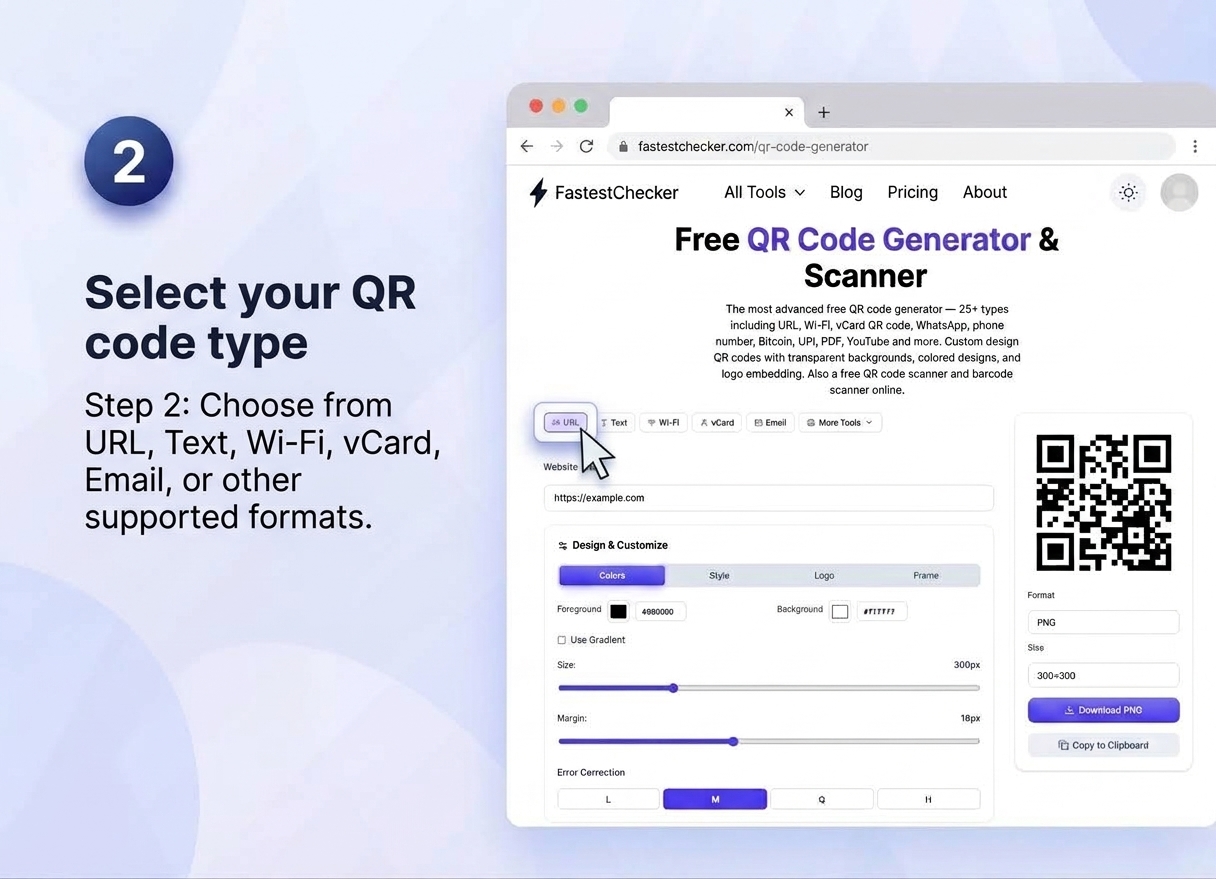
- Select your QR code type. Choose the exact format that best suits your needs from the top navigation bar. Options include Website URLs, Plain Text, Wi-Fi Network Credentials, vCard/Contact Details, Email Addresses, Phone Numbers, WhatsApp Links, PDFs, and social media channels.
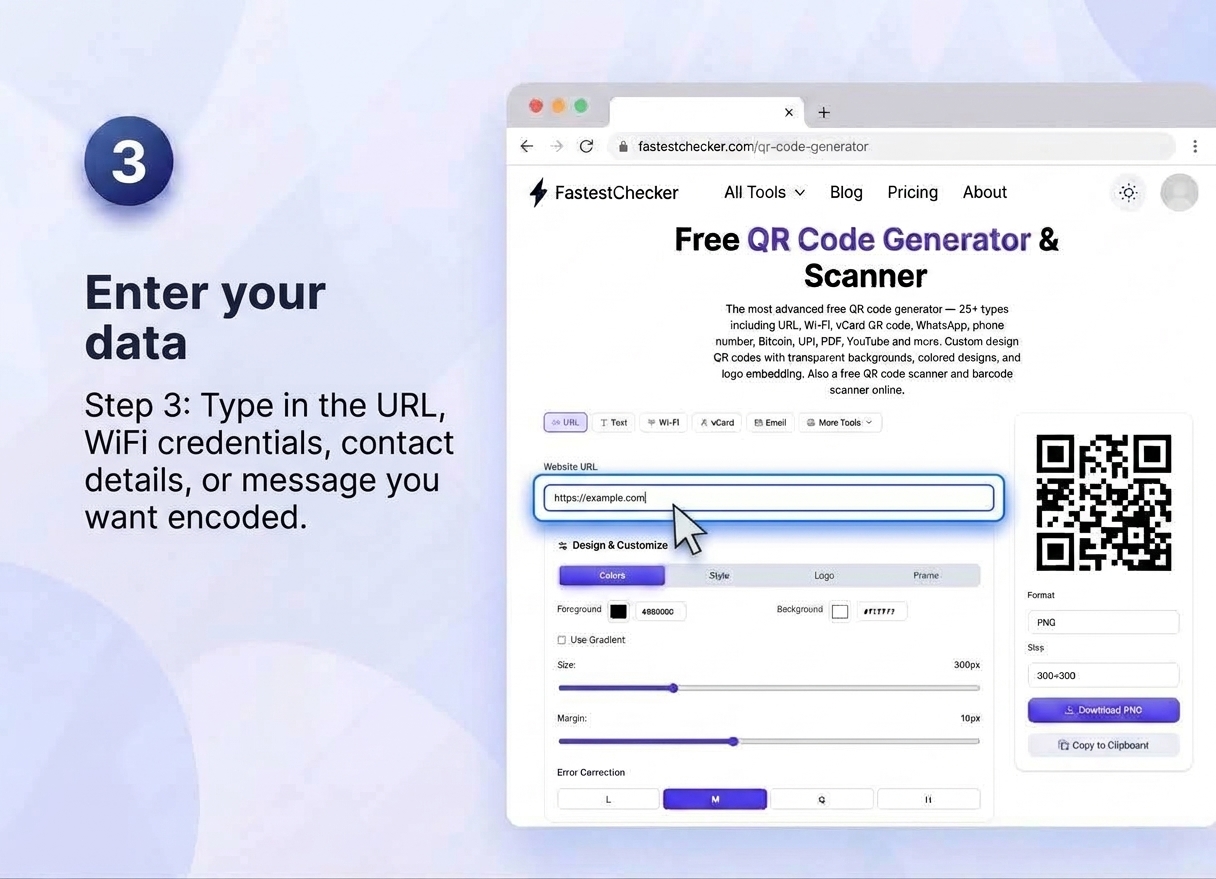
- Enter your data. Input the required details into the corresponding fields. Whether you are adding a webpage link, setting up automatic Wi-Fi login credentials (SSID and password), entering complete contact details for a digital business card, or writing a custom message, ensure all information is accurate before proceeding.
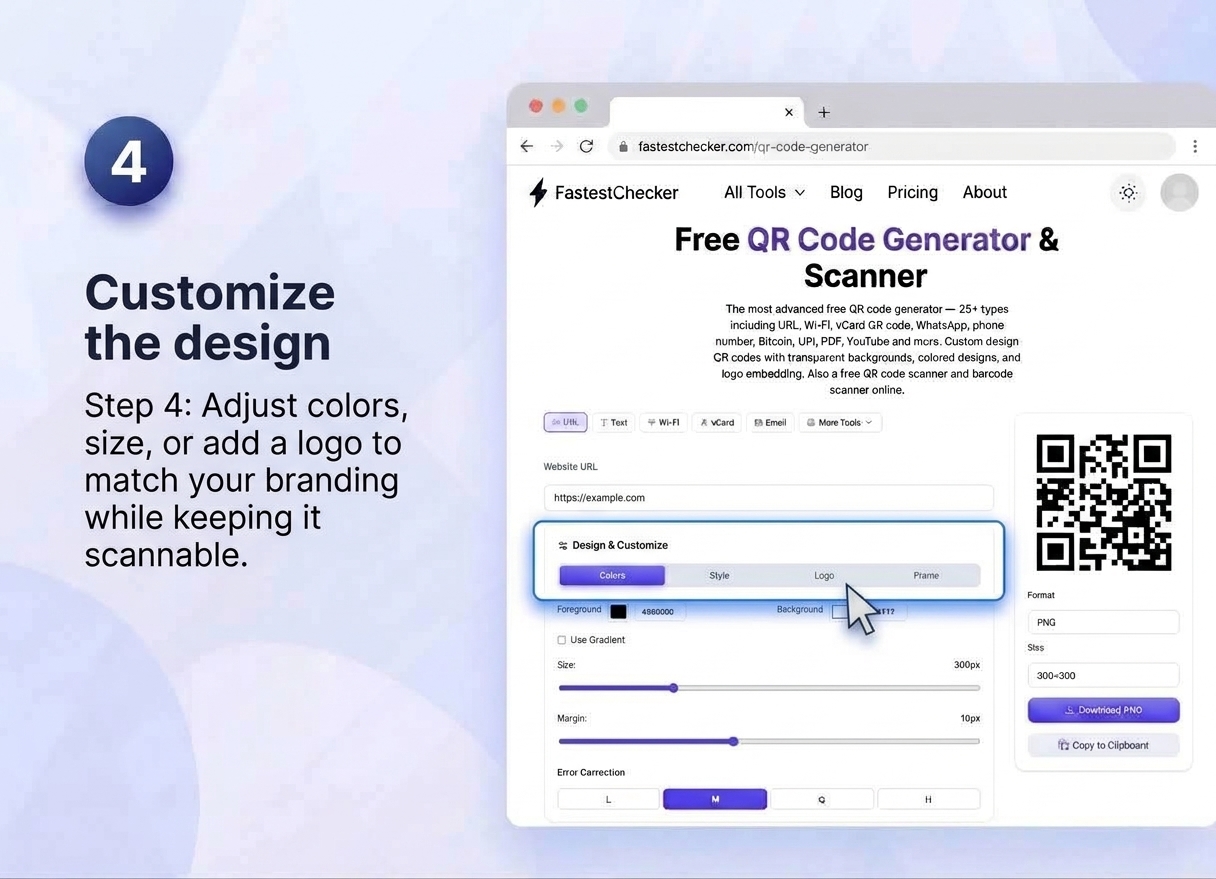
- Customize the design (if available). Personalize your QR code to align with your brand identity. Use the built-in design controls to adjust foreground and background colors, apply custom color gradients, modify corner styles, set specific margins, adjust error correction levels, and upload your personal or brand logo directly into the center.
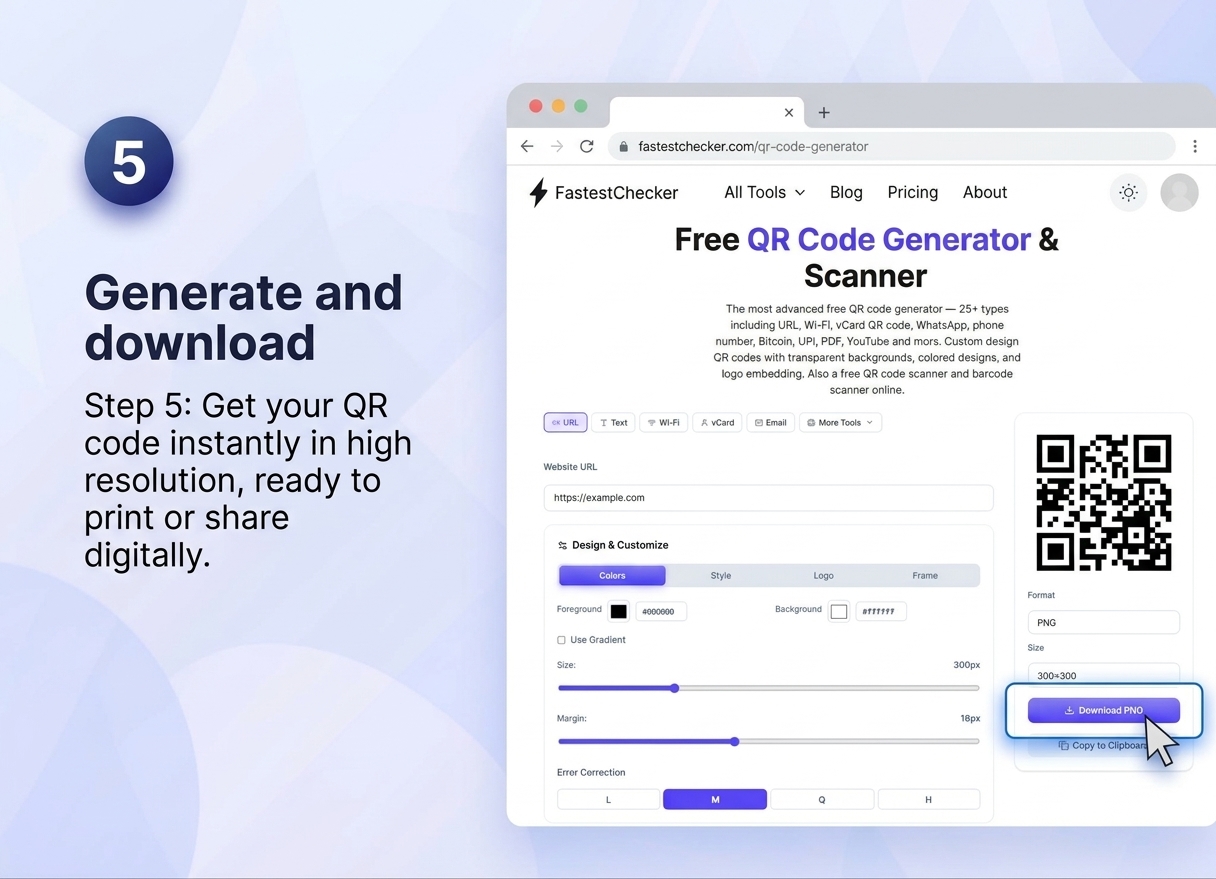
- Generate and download. Preview your customized QR code instantly on the screen and export it in high-resolution PNG or SVG format. Your generated QR code is optimized for seamless scanning and is immediately ready to print on physical marketing materials or share across digital channels.
Static vs. Dynamic QR Codes: What's the Difference?
| Feature | Static QR Code | Dynamic QR Code |
|---|---|---|
| Editable after creation | No | Yes |
| Scan tracking/analytics | No | Yes |
| Best for | Permanent info (WiFi, one-off print) | Marketing campaigns, evolving content |
| Cost | Usually free | Often subscription-based |
| Code complexity | Simpler pattern | Slightly denser pattern |
Best Practices for Designing Scannable QR Codes
- Maintain sufficient contrast. Always use high-contrast color combinations to ensure maximum scannability. A dark QR code placed against a plain light background (preferably crisp white) is processed much faster and more reliably by optical camera sensors than low-contrast, muted, or inverted color schemes.
- Keep quiet zones intact. Ensure a clean, clear border—known as the "quiet zone"—is maintained all around the outer edges of your QR code. Never crop the graphic too tightly, overlay text, or place decorative elements near the boundary, as camera scanners need this empty space to distinguish the code from surrounding graphics.
- Don't go too small. Pay close attention to physical dimensions when preparing your code for print materials like flyers, business cards, or packaging. A standard minimum size of at least 2×2 cm (0.8×0.8 inches) is recommended for close-range reading, while larger surfaces like billboards or posters require significantly scaled-up dimensions relative to viewing distance.
- Test before mass printing. Thoroughly test your generated QR code across multiple smartphone models, operating systems (iOS and Android), and different camera apps under various lighting conditions. Verifying scannability prior to initiating full-scale print production prevents costly re-printing errors and guarantees a smooth user experience.
- Avoid excessive customization. While adding brand colors or embedding a central logo enhances visual appeal, avoid over-customizing key structural elements. Complex visual patterns, heavy gradient fills, or overly large embedded images can obscure built-in data modules and disrupt the built-in error-correction system, resulting in failed scans.
Common Use Cases Across Industries
Restaurants and Cafes
Digital menus accessible via a single table-top QR code reduce printing costs and allow instant menu updates without reprinting physical copies.
Retail and Packaging
Product packaging QR codes can link to instructions, warranty registration, or promotional content, adding value beyond the physical product.
Real Estate
Yard signs and property flyers with QR codes let potential buyers instantly access listing photos, videos, and details from their phone.
Events and Conferences
QR codes streamline check-in processes, ticket validation, and provide instant access to event schedules or networking profiles.
Business Cards
A vCard QR code on a business card lets contacts save your details directly to their phone with one scan — no manual data entry, no typos.
Security Considerations When Using QR Codes
While QR codes are convenient, they've also become a vector for phishing scams — a technique sometimes called 'quishing.' Since users can't visually verify a QR code's destination before scanning, malicious codes can redirect to fake login pages or malware downloads.
Before scanning unfamiliar QR codes in public places, be cautious of codes that appear to be stickers placed over original ones. If you're generating QR codes yourself, always verify the destination URL is correct and, ideally, use a domain your audience will recognize and trust. You can further verify the legitimacy of destination sites using our Website Age & WHOIS Checker before linking to them.
Pairing QR Codes with Other FastestChecker Tools
QR codes are just one piece of a solid digital toolkit. If your QR code links to a website, make sure that destination loads fast and performs well — test it with our PageSpeed & Web Vitals Checker. If you're generating a WiFi QR code for a business location, confirm your network speed is reliable using our Wi-Fi Speed Test. And if you're distributing product QR codes alongside barcodes for inventory, our Barcode Generator covers that need too.
Final Thoughts
QR codes remain one of the simplest, most cost-effective tools for connecting physical materials to digital experiences. Whether you're sharing a WiFi password, promoting a website, or building a digital business card, a well-designed QR code removes friction and gets people where you want them, instantly.
Ready to create your own? Try our free QR Code Generator now — no signup required, and your code is ready to download in seconds.
Frequently Asked Questions
Is the FastestChecker QR Code Generator free to use?
Yes, our QR Code Generator is completely free to use with no signup required. You can create and download QR codes for URLs, WiFi, contact cards, and more instantly.
Do QR codes expire?
Static QR codes never expire since the data is embedded directly in the code itself. Dynamic QR codes, however, rely on a redirect service and could stop working if that service is discontinued.
Can I customize the color and design of my QR code?
Yes, many QR code generators allow color and logo customization, but it's important to maintain strong contrast and avoid excessive design changes that could interfere with scannability.
Are QR codes safe to scan?
Most QR codes are safe, but since you can't see the destination before scanning, it's wise to be cautious with codes from unfamiliar or public sources, as scammers sometimes place malicious codes over legitimate ones.
Muhammad Asad Arshad is the Founder and Lead Software Architect of FastestChecker, specializing in client-side Web APIs, cryptographic standards, and network diagnostics.